Artificial Intelligence is revolutionizing software testing. From self-healing test scripts to intelligent test generation, AI is solving problems that have plagued test automation for decades. This comprehensive guide explores how AI is transforming testing and how you can leverage it in your workflow.
What is AI Testing?#
AI testing refers to the application of artificial intelligence and machine learning techniques to improve software testing processes. Unlike traditional testing that relies on rigid, pre-programmed scripts, AI testing adapts, learns, and makes intelligent decisions based on patterns and data.
Traditional Testing vs AI Testing#
Traditional Testing:
Traditional tests rely on explicit selectors (like CSS classes, IDs, or XPaths) to locate elements. If these selectors change due to UI updates, the test breaks, requiring manual intervention to fix.
// Breaks when CSS class changesawait page.click(".submit-button-v2");// Result: Test fails, manual fix required
// Breaks when CSS class changesawait page.click(".submit-button-v2");// Result: Test fails, manual fix required
AI Testing (e.g., ObserveOne):
You point the AI at your app and it plans scenarios and generates Playwright tests for you. When the UI changes and a test breaks, a healer agent inspects the live page and patches the script instead of leaving it red. You own the generated Playwright and can edit it in the built-in editor.
How AI Enhances Testing#
AI improves testing in several ways:
- Self-Healing: Automatically fixes broken selectors when the UI changes
- Test generation: Produce runnable tests from a URL or plain-English scenarios instead of writing every script by hand. ObserveOne explores your app and writes Playwright suites you can edit.
Types of AI Testing#
1. Self-Healing Test Automation#
Self-healing tests automatically adapt when the application changes. The longer version is in our guide on how self-healing test automation works, which covers the selector breakages a healer recovers and the ones it does not.
How it works:
- Learning Phase: AI captures multiple attributes of each element
- Detection Phase: When a selector fails, AI analyzes the page
- Healing Phase: AI finds the element using alternative attributes
Example with ObserveOne:
A generated test targets an element directly:
// Generated Playwrightawait page.getByTestId("submit-btn").click();
// Generated Playwrightawait page.getByTestId("submit-btn").click();
If that selector changes in a later release, the run fails once. The healer agent then opens a browser, finds the right element on the current page, and patches the test so the next run passes, with no manual fix.
Real-world impact:
- Reduced Maintenance: Tests don't break when UI styles change.
- Faster Authoring: Write intent-based instructions instead of hunting for selectors.
- Higher Reliability: Flaky failures caused by minor UI updates are sharply reduced.
2. Visual regression testing#
Visual regression testing catches UI changes that functional assertions miss. It compares screenshots between runs and flags layout or styling breaks while ignoring minor, expected differences. It is a separate discipline from functional testing, handled by dedicated visual-testing tools and run alongside your functional suite rather than instead of it.
3. AI Test Generation#
Instead of writing every script by hand, you describe the app or the scenario and the AI produces runnable tests.
Traditional authoring means hand-writing and maintaining each script:
await page.getByTestId("submit-btn").click();
await page.getByTestId("submit-btn").click();
AI generation turns a URL or a plain-English scenario into a full Playwright suite. With ObserveOne you paste your app URL, the AI explores your pages and plans scenarios such as "complete the checkout process," and it writes the Playwright for you. You review and edit the generated scripts, then run them on a schedule or in CI.
Benefits:
- Faster authoring: cover key journeys without writing scripts from scratch
- You own the output: the generated Playwright is yours to read, edit, and version
- Lower maintenance: self-healing repairs selectors when the UI shifts
- Handles complex, dynamic flows like checkout and multi-step forms
AI Testing Tools Comparison#
Comparison of tools in the space. Prices and features as of 2026; verify on vendor sites.
| Tool | Self-Healing | Natural language (NL) interface | Price |
|---|---|---|---|
| ObserveOne | ✅ | ✅ | See pricing |
| Testim | ✅ | ❌ | Custom |
| Mabl | ✅ | ✅ | Custom |
| Functionize | ✅ | ✅ | Custom |
Resources (pricing & features): ObserveOne · Testim · Mabl · Functionize
ObserveOne focuses on self-healing and natural language flows; see current pricing for plan details, and pair it with a dedicated visual regression tool if you need screenshot comparison.
For a traditional (non-AI) testing framework, see Playwright.
How to Implement AI Testing#
Step 1: Choose a flow to test#
Pick one user flow (e.g. checkout, pricing page, homepage, search). You don't write the tests by hand; the AI generates them, and you can edit the generated Playwright later if you want fine control.
Step 2: Paste your URL and let the AI build the suite#
In the Autopilot dashboard, paste your app URL and start a run. The AI explores your pages, plans test scenarios, and generates Playwright scripts, then runs them on a real browser while you watch live. From there you can set a schedule and connect CI without leaving the page.
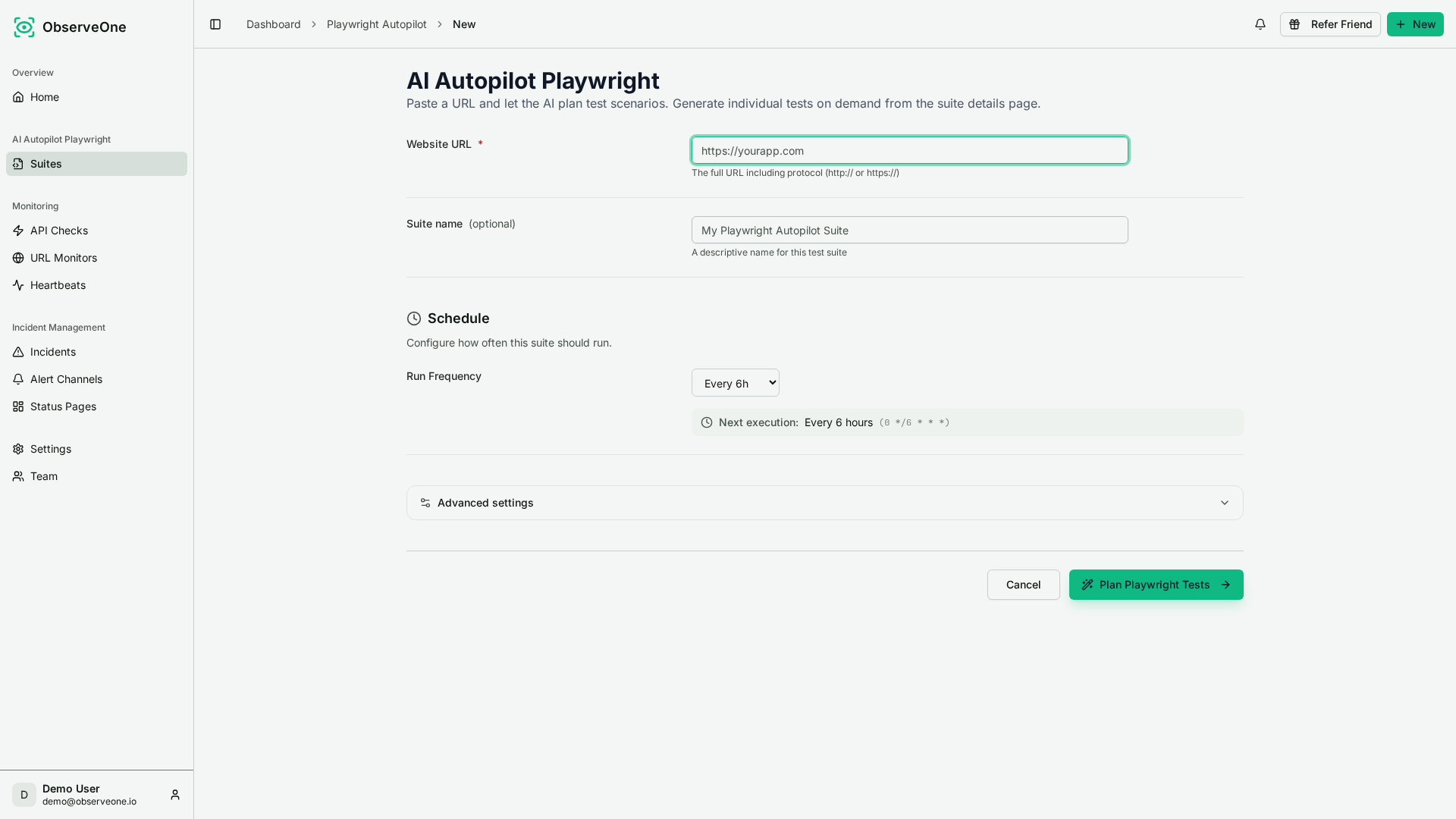
Paste a URL, set an optional schedule, and let Autopilot plan the test scenarios.
Prefer the terminal? Everything in the UI is also a CLI command, so you can generate and run the same suite from a script or pipeline:
obs suite generate https://example.comobs suite run <suite-id> --wait
obs suite generate https://example.comobs suite run <suite-id> --wait
Step 3: Review the run#
Each run streams its logs live as the tests execute, so you can see what is passing or failing. Open the generated Playwright in the built-in editor to adjust a scenario, or re-generate if the app changed a lot.
Step 4: Add more flows and let it maintain itself#
Add suites for other pages and flows. When a selector changes and a test breaks, the healer agent opens a browser, inspects the page, and patches the script automatically, with an LLM fallback if needed.
With ObserveOne you get#
- No tests to write: Paste a URL; the AI plans scenarios and writes the Playwright for you.
- Editable output: Fine-tune the generated Playwright TypeScript in the built-in editor.
- Self-healing: When the UI changes, the healer agent patches the script instead of failing.
- Live log streaming: Watch the run's logs stream in real time.
- Scheduling and CI: Cron schedules plus a GitHub App that triggers runs on push and posts status checks and PR comments.
- Alerts: Get notified on Slack, email, and other channels when a run fails.
- Stable flows: Complex flows (checkout, product pages, key journeys) covered by generated Playwright that self-heals.
Best Practices#
1. Start Small#
Don't replace all tests with AI at once. Add it to a few critical flows first, validate, then expand.
2. Review runs#
Use the streamed run logs to review what the agent did. You stay in the loop by interpreting the outcome and re-running or adjusting instructions when needed.
3. Monitor AI Decisions#
Track what AI changes to catch mistakes.
Dashboard metrics:
- Agent execution success rate
4. Combine AI with Traditional Testing#
Use AI where it excels, traditional testing elsewhere.
AI for:
- UI testing (self-healing, AI agents)
- End-to-end (E2E) flows (complex scenarios)
Traditional for:
- Unit tests (fast, deterministic)
- API (application programming interface) tests (stable contracts)
- Security tests (specific vulnerabilities)
5. Use the run artifacts#
The run logs, streamed live as it executes, show exactly what the agent did. Use them to confirm the outcome or to refine instructions and re-run when you want to change the flow.
Challenges and Limitations#
Keep runs reviewable#
Don’t treat AI runs as fire-and-forget. Review runs using the streamed logs so you confirm what actually happened and can refine instructions when needed.
Future of AI Testing#
Emerging Trends#
1. Autonomous Testing AI creates, runs, and maintains tests without human intervention.
2. Conversational Test Creation
You: "Test the checkout flow"AI: "I'll verify the cart, checkout form, and success message. Should I also test with an empty cart?"You: "Yes"AI: "Done. 2 scenarios created."
You: "Test the checkout flow"AI: "I'll verify the cart, checkout form, and success message. Should I also test with an empty cart?"You: "Yes"AI: "Done. 2 scenarios created."
3. Self-Optimizing Test Suites AI automatically removes redundant tests and adds missing coverage.
4. Cross-Application Learning AI trained on millions of apps, not just yours.
5. AI-Powered Test Oracles AI determines expected behavior without explicit assertions.
Conclusion#
AI testing augments traditional testing: let the AI generate and maintain your Playwright suites, and review every run through its live-streamed logs. Sign up for ObserveOne's free tier or run Autopilot now to generate your first Playwright suite in minutes.