Autopilot generates Playwright tests from a URL. This page covers the dashboard side of it: the form, the states a suite moves through, and what each tab on a suite does. For what Autopilot is, covering planning, healing, credentials and regeneration, read AI browser tests. For the terminal equivalent, Autopilot suites (CLI).
Suites live under Autopilot → Suites in the sidebar.
Creating a suite#
Open Suites and choose New.
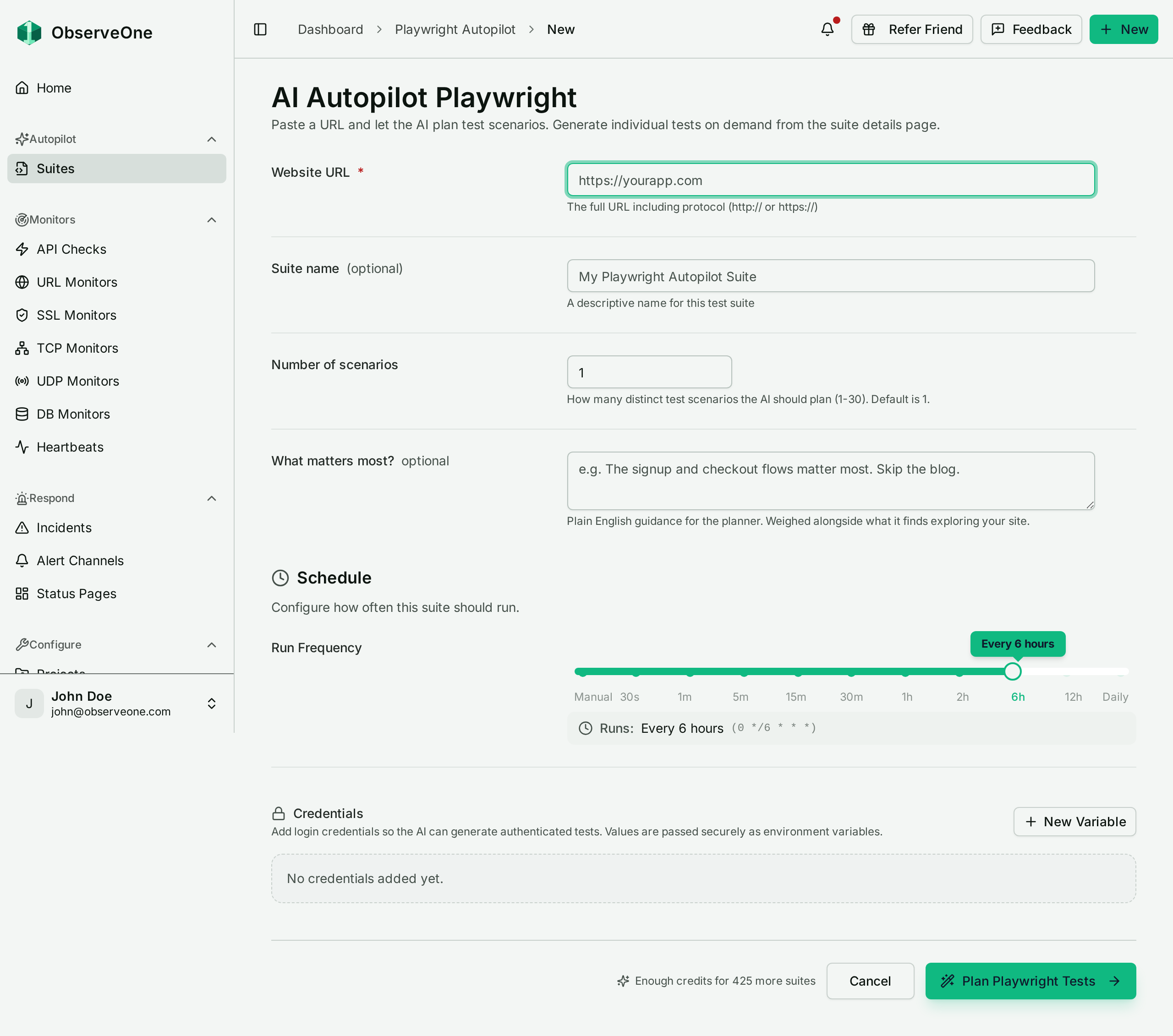
The fields:
| Field | Notes |
|---|---|
| Website URL | Required. The site Autopilot explores. |
| Suite name | Optional. Defaults to a generated name. |
| Number of scenarios | How many distinct scenarios the planner should write. Default is 1; the upper bound comes from your plan. |
| What matters most? | Optional free text steering the planner, e.g. "The signup and checkout flows matter most. Skip the blog." |
| Environment variables | Name/value pairs the tests can use. Values are masked in the form; a toggle reveals them. |
| Run Frequency | A slider, from Manual through 30s, 1m, 5m, 15m, 30m, 1h, 2h, 6h, 12h to Daily. |
Submitting kicks off generation immediately.
Steering the planner#
The What matters most? box changes the output more than any other field on the form. The planner explores whatever it can reach, so without steering it spends scenarios on pages that do not matter to you. Naming the two or three flows you actually care about, and naming what to skip, changes what gets written far more than raising the scenario count does.
Reading suite status#
The suites list shows a status per suite. The ones ending in an ellipsis are stages in progress:
- Pending: queued, nothing has started yet.
- Planning...: the planner is exploring the site and deciding which scenarios are worth writing.
- Generating...: each planned scenario is being turned into a Playwright spec.
- Self-healing...: a run broke and Autopilot is repairing the affected selectors.
- Failed: the run did not produce specs. Open the suite to see why.
- Active: the suite has specs and its schedule is on.
- Needs tests: the suite exists but has never had a spec generated.
- Paused: the suite has specs and you switched its schedule off.
From the list you can search suites, toggle Enable/Disable scheduled runs per suite, and delete a suite.
The suite detail tabs#
Opening a suite gives you three tabs:
- Tests: the generated specs. Read them, and see each one's recent result.
- Runs: execution history. A run opens into a live log, a progress bar per test, and a trace viewer for failures.
- Configuration: everything else, stacked as sections on one page. General, Generation, Environment variables, Alerts, Schedule, Public report and CI integrations.
Older links that pointed at separate schedules, env-vars, integrations or settings tabs still work, and land on Configuration.
Alerting lives in the Alerts section of Configuration: a Notify me about this suite switch, a choice of A test failed or The run itself failed, and a picker for which alert channels to notify. If your account already has an email channel, a new suite is subscribed to it automatically, so it is not created silently unmonitored. An account with no email channel at all gets no subscription, and the suite is created anyway.
Why a run can be blocked#
Running a suite spends two separate currencies, and either can stop a run:
- AI verifications: spent by running a suite, and only by running it. They are capped per billing period, and when they are gone you see No AI verifications left this period.
- AI credits: spent by planning, generating and healing. When they are gone you see Out of AI credits.
The split matters in practice. Regenerating a suite costs credits but no verification, and a scheduled run costs a verification but no credits. If runs stop but generation still works, you are out of verifications, not credits.
When both are exhausted the dashboard names verifications first. They are counted in different places: verifications on Settings → Usage, your credit balance on Settings → Billing. Credits refill monthly, on your billing period, and the balance shows how many days are left until then.
Next steps#
- Teams, roles & billing for where the two counters live and what your plan includes.
- Notification channels to give a suite somewhere to send its alerts.
- Autopilot suites (CLI) to drive the same suites from a terminal or CI.